
Build Slack-Style Chat and Threads with Claude Code and Sendbird CLI


Sendbird CLI manages Sendbird apps, Chat, and Calls from the command line. The Sendbird Client plugin gives AI coding agents Sendbird-specific SDK guidance for writing application code.
We used Claude Code and these tools to build Teamline, a Slack-style React chat app with channels, custom screens on the Sendbird Chat SDK, and threaded replies. The agent then used the CLI to post a reply as another user and verify that it belonged to the intended thread.
A team conversation can contain several topics at once. Threaded replies keep each discussion attached to its original message. That relationship needs to be correct in the message data and reflected in the interface people use.
Build a React team chat with Claude Code
Use Claude Code on your computer and a Sendbird test app that does not serve real users.
Sendbird provides official CLI and Client plugins for Claude Code and Codex. Install the two plugins. When the agent needs your Sendbird account, it opens a browser sign-in for you to approve.
Terminal / Install both plugins
claude plugin marketplace add sendbird/sendbird-plugins
claude plugin install sendbird-cli@sendbird
claude plugin install sendbird-client@sendbird
For official source and installation details, see the Sendbird plugin marketplace, the Client Plugin source on GitHub, and the Sendbird CLI package on npm.
Start a new Claude Code session after installation so the plugins load. The installation guides cover the CLI plugin and Client plugin.
In your project folder, give Claude Code the same build request we used:
Claude Code / Exact build request
Build a Slack-style team chat in React with my own chat screens on the Chat SDK (call it Teamline, no Slack branding) with channels and threaded replies, then use the Sendbird CLI to post a reply as another user and confirm it landed in the right thread.The request gives the agent an interface to build and a specific behavior to check. The Client plugin supports the SDK implementation work, while the CLI lets the agent act against the Sendbird test app and inspect the results.
Verify that a reply belongs to the right thread
Claude Code built a channel list, message list, and right-hand thread pane. It created the test channel teamline-general for the CLI check:
The agent reused two existing test users from another demo, streamly_host and viewer_kai.
- Prepared two parent messages:
413106884, “Kickoff: what should we ship first this sprint?”, and413106886, “Separate topic: retro is moved to Friday.” - Posted a reply as
viewer_kaito parent413106884. Sendbird accepted reply413106887withparent_message_id: 413106884. - Read both threads. The intended thread contained one reply, and the unrelated thread contained zero.
- Read the channel’s message list and confirmed that the intended parent had
reply_count: 1.
These commands are excerpts from the agent’s recorded check:
Terminal / Recorded CLI commands
sendbird chat message reply --type group --id teamline-general --as-user viewer_kai --message-id 413106884 --message "Let's ship the thread panel first."
sendbird chat message thread --type group --id teamline-general --as-user streamly_host --message-id 413106884
sendbird chat message thread --type group --id teamline-general --as-user streamly_host --message-id 413106886
The channel, message IDs, and users above belong to the recorded test. Use resources from your own test app when repeating the check.
✓ Thread association verified
The reply was attached to the intended parent. The unrelated thread remained empty, and the intended parent’s reply count matched the result.
This is the CLI’s contribution to the coding workflow: the agent can create a real message in a Sendbird test app and check its relationship to the surrounding conversation. The Chat SDK message-threading guide explains the parent-message relationship used by threaded replies.
Refine the team chat interface
Once the channel and thread behavior had been checked, we gave Claude Code a separate design request:
Claude Code / Exact design request
Restyle Teamline so it looks and feels like Slack: a deep aubergine sidebar, bold unread channel names, colored square avatars with initials, and a rounded message composer. Keep the name Teamline and don't use Slack's logo. Only change the look; keep the chat behavior as it is and don't use the Sendbird CLI.
Check a live thread with two users
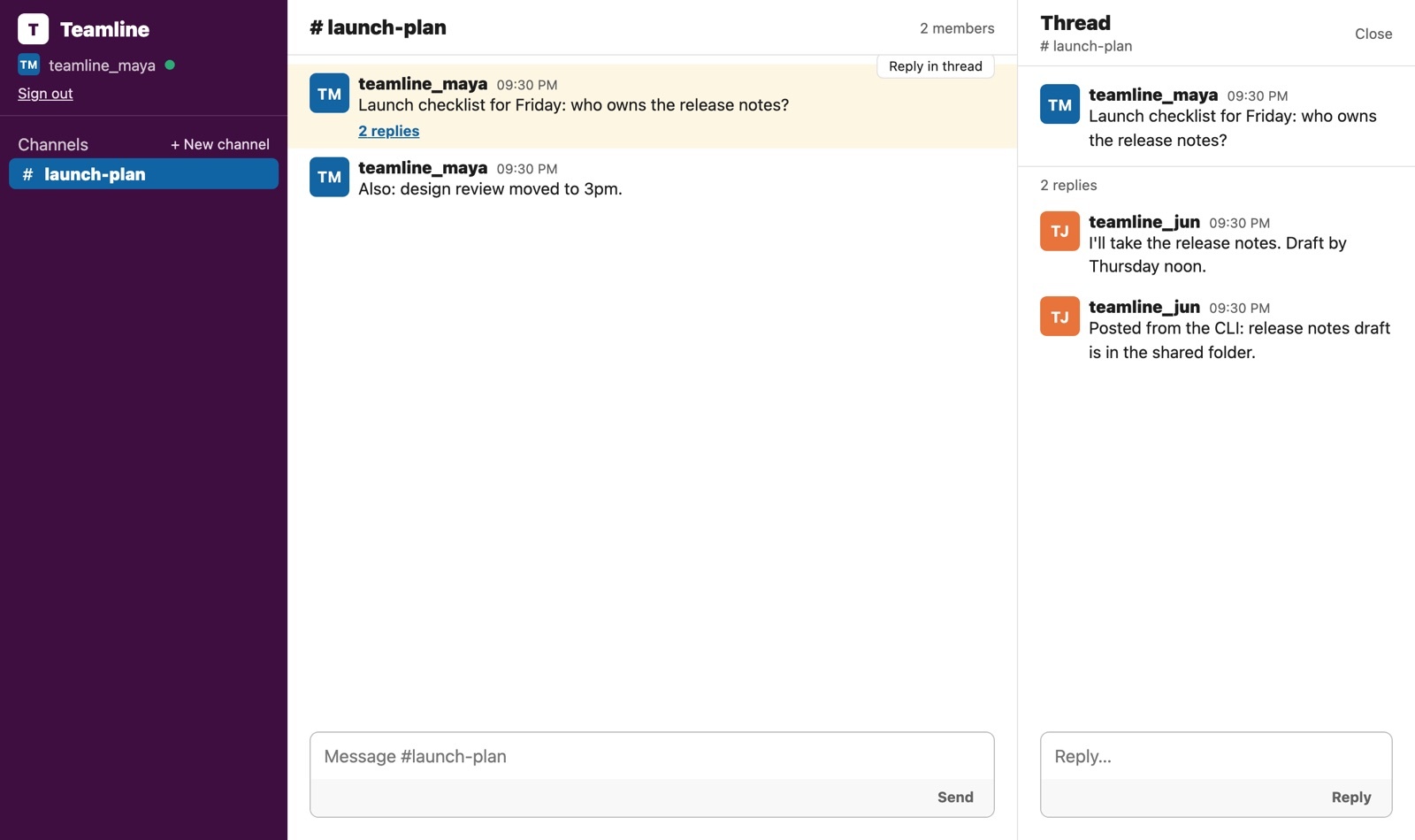
After the agent run, our team checked the experience in the browser with teamline_maya and teamline_jun:
- Maya created the
launch-planchannel and posted a message. - Jun replied to that message from the app.
- We used the CLI to add another reply as Jun.
- The CLI-sent reply immediately appeared in the thread Maya already had open, and the parent message displayed “2 replies”.
Time and Claude usage
| Request | Time | Claude usage at API prices |
|---|---|---|
| Initial build and CLI check | 13 min 23 sec | $3.35 |
| Design refinement | 5 min 23 sec | $1.19 |
Sendbird fees not included.
Connect threaded chat to your service
For a service with real users, authenticate people through your application, issue their Sendbird tokens from your backend, and control channel membership. Derive the sender from the authenticated session and ensure that replies target a parent message in the intended channel.
The CLI identities in this example are test users. Follow the server-issued token guidance when connecting your application’s users.
Build your own team chat app
Start with a channel, a parent message, and the reply behavior you want to support. Ask your coding agent to build the interface and use the CLI to verify that the reply belongs to the intended thread. Then check the receiving experience in the app.
Explore Sendbird CLI and Client plugin.
Start building with Sendbird for free. Add chat to your app with the Client plugin’s Add Chat guide.
Teamline is a demonstration app inspired by a team-messaging pattern. It is not affiliated with Slack and does not use Slack’s logo.